How can I cancel my subscription?
Important notice: Some users have reported unexpected charges from third-party websites they believed were associated with remove.bg. Before purchasing credits, please verify that you’re on our official website: remove.bg. Any other domain (e.g., rbgrd.com, remove-background.com, removebackground.com, allremovebg.com, removebackground.app) is not affiliated with us. Read more here.
To cancel your subscription, follow the steps below:
1. Go to your Dashboard.
2. Click on Cancel subscription.
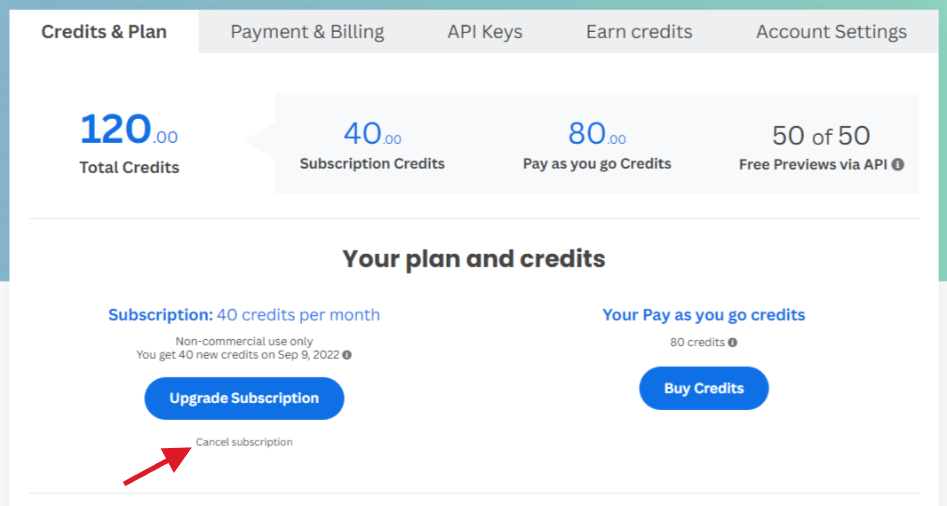
3. Select the reason for cancellation. Your feedback is really important to us, but if you want you can skip this step on the bottom of the list.
4. Confirm cancellation by clicking on Cancel subscription. Note: if you proceed, your remaining credits will be invalidated at the end of the billing period.
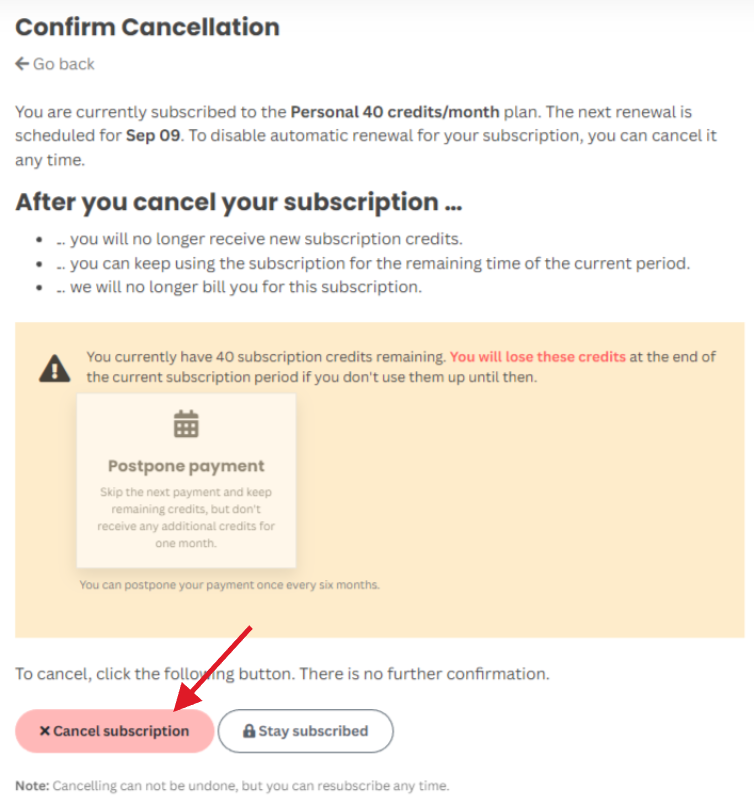
Done! Your subscription is now cancelled. You will not be billed again and you can use the remaining credits until the end of the billing period.