Μετάβαση στο κύριο περιεχόμενο
General & Website
How to enhance your background with the new Magic Background feature

How to enhance your background with the new Magic Background feature

The Magic Background feature in the remove.bg editor lets you create high-quality, AI-generated backgrounds that blend seamlessly with your subject. Instead of just replacing the background, it builds a custom scene that takes into account your image’s perspective and colors, so the final result looks realistic and professional. There’s no need to write prompts—just a few clicks, and the AI handles the rest.

Where to find the Magic Background feature

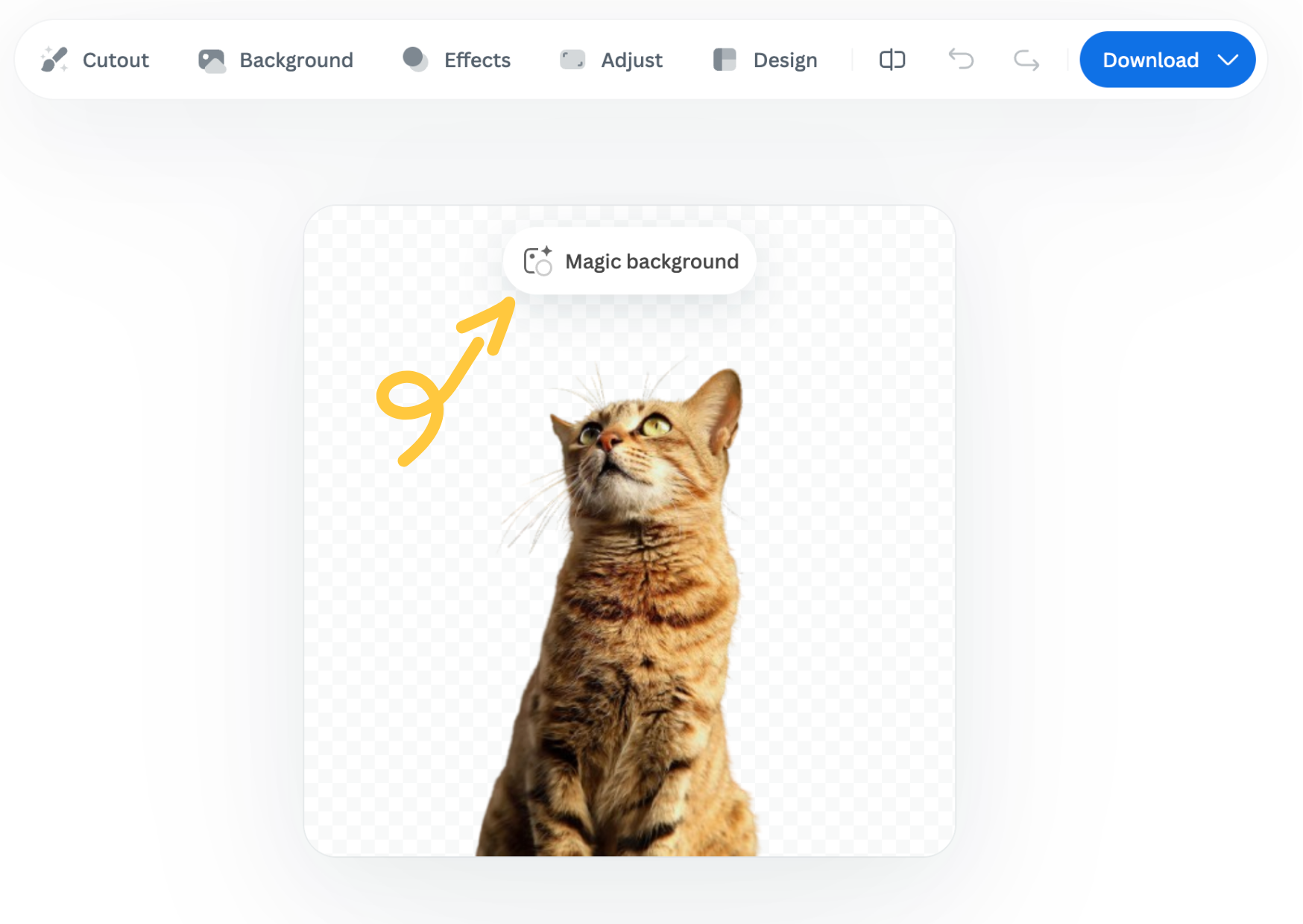
You can find the Magic Background feature after uploading your image to remove.bg

  1. Upload your image.

  2. In the editor window, click “Magic background” to start using the feature.
How to use it

  1. Pick an inspiration: Choose a background style from the available presets. This will be used as a starting point for your scene.

  2. Click “Generate background”: The AI analyzes your image and creates a background that fits your subject in terms of depth and color. Each match costs one credit.

  3. Want a different variation? Click “Generate again” to generate a new version based on the same background inspiration.

  4. Once you're happy with the result, you can download a free preview (up to 0.25 megapixels) or spend 1 credit to download the HD version.

Important notes

  • Each background generation costs 1 credit.

  • The Magic Background feature is currently available only in the remove.bg web editor.

  • Magic Background is currently in beta, and we welcome your feedback to help improve the tool. Let us know what you think!

Was this article helpful? Yes No
Thanks for your feedback.
  • Μάθετε περισσότερα

  • Όλες οι λειτουργίες
  • Φωτογράφοι
  • Μάρκετινγκ
  • Προγραμματιστές
  • Ηλεκτρονικό εμπόριο
  • Μέσα
  • Αντιπροσωπείες αυτοκινήτων
  • Επιχειρήσεις
  • Ιστορίες επιτυχίας
  • Εργαλεία και API

  • Τεκμηρίωση API
  • Ενσωματώσεις, εργαλεία και εφαρμογές
  • Επέκταση Photoshop
  • Windows / Mac / Linux
  • Εφαρμογή Android
  • Πρότυπα σχεδίασης
  • Υποστήριξη

  • Βοήθεια και συχνές ερωτήσεις
  • Επικοινωνήστε μαζί μας
  • Επιστροφές χρημάτων
  • Κατάσταση πλατφόρμας
  • Πόροι
  • Εταιρεία

  • Ιστολόγιο
  • Πρόγραμμα συνεργατών
  • Δημιουργήστε αυτόματα σχέδια
  • Αφαίρεση φόντου βίντεο
  • Ευκαιρίες εργασίας
  • Πληροφορίες για εμάς
  • Τύπος και συνεργασίες

© remove.bg, a Canva Austria GmbH brand

  • Όροι παροχής υπηρεσιών
  • Γενικοί όροι και προϋποθέσεις
  • Πολιτική απορρήτου
  • Πολιτική για τα Cookies
  • Αποτύπωμα

Σας ευχαριστούμε για τα σχόλια!

Θέλετε να μας βοηθήσετε να γίνουμε καλύτεροι; (προαιρετικό)

  • Συνεισφέρετε αυτήν την εικόνα και βοηθήστε μας να κάνουμε το remove.bg καλύτερο
  • Διδάξτε την τεχνητή νοημοσύνη
  • Λάβετε καλύτερα αποτελέσματα για παρόμοιες εικόνες στο μέλλον
Επιλέξτε το αν θέλετε να χρησιμοποιήσουμε αυτήν την εικόνα για βελτιώσεις ποιότητας.
Επιλέξτε το αν ΔΕΝ θέλετε να χρησιμοποιήσουμε αυτήν την εικόνα για βελτιώσεις ποιότητας.

Η εικόνα σας θα χρησιμοποιηθεί για μελλοντικές βελτιώσεις του remove.bg.

Η εικόνα σας ΔΕΝ θα χρησιμοποιηθεί για μελλοντικές βελτιώσεις του remove.bg.